Create Upsell Group
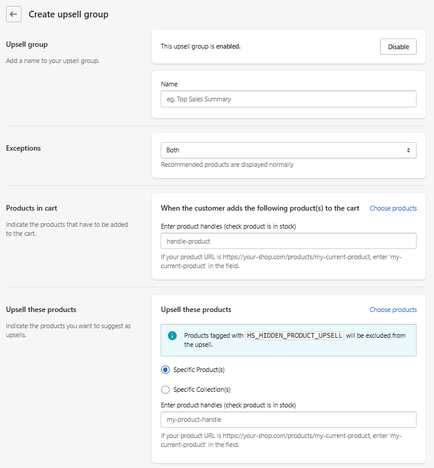
The Create Upsell Group section allows you to define custom upsell rules based on products added to the cart.
Each upsell group acts as a condition-based recommendation system.
Access
From the main upsell section:
- Click Create New Group
- This opens the upsell group configuration panel
Feature Status
At the top of the group:
- Enabled → This upsell rule is active
- Disabled → The rule will not be applied
Upsell Group
Name
Defines the internal name of the upsell group.
- Example: Top Sales Summary
This is only for internal organization and does not appear to customers.
Exceptions
Behavior Control
Defines how the upsell behaves under certain conditions.
- Example: Both → Recommended products are displayed normally
This setting helps control edge cases in recommendation logic.
Trigger Condition (Products in Cart)
Products in Cart
Defines which products will trigger the upsell.
Enter Product Handles
You must specify product handles (URL identifiers).
-
Example:
If product URL is:
your-shop.com/products/my-product
→ Enter: my-product
Choose Products
Alternatively, you can select products directly using the picker.
Upsell Products
Upsell These Products
Defines what products will be recommended.
Selection Type
- Specific Products → manually selected items
- Specific Collections → dynamic product groups
Product Handles Input
You can also define products via handles.
Exclusion Rule
⚠️ Products tagged with
HS_HIDDEN_PRODUCT_UPSELL
will be automatically excluded
How It Works
- Customer adds a product to the cart
- The system checks all upsell groups
- If a match is found → corresponding products are suggested
- Recommendations appear in the cart
Multiple Groups Behavior
If multiple groups apply:
- They can stack
- Or mix (depending on settings like cross-mix)
Multiple Groups Behavior
If multiple groups apply:
- They can stack
- Or mix (depending on settings like cross-mix)
Best Practices
- Use clear product relationships
- Avoid overlapping or conflicting groups
- Test different combinations
- Keep recommendations relevant

Summary
The Create Upsell Group feature allows you to:
- Build custom upsell logic
- Define trigger → recommendation relationships
- Control product suggestions manually
- Create advanced cross-sell strategies
It is the core engine of the upsell system and the most powerful tool for increasing average order value.

