Cart Settings
The Cart Settings section provides advanced configuration options to control the behavior, display, and logic of the slide cart.
These settings allow you to fine-tune how the cart behaves and how information is presented to customers.
Additional Settings
This section includes multiple toggle options that affect cart functionality:
General Behavior
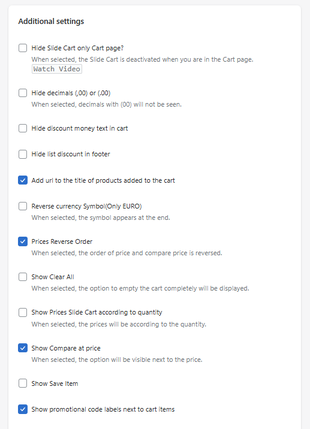
Hide Slide Cart on Cart Page
When enabled:
- The slide cart is disabled on the cart page
Open Cart Drawer on Add to Cart
When enabled:
- The cart automatically opens when a product is added
Show Clear All
Displays an option to completely empty the cart.
Pricing & Currency
Hide Decimals (.00)
Removes decimal values from prices.
Reverse Currency Symbol (EURO only)
Displays the currency symbol at the end.
Prices Reverse Order
Reverses the order of:
- Price
- Compare-at price
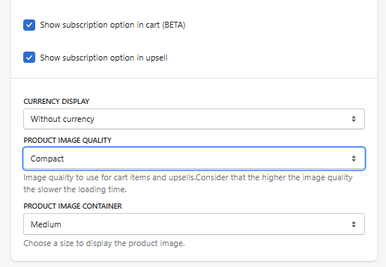
Currency Display
Controls how currency is shown.
- Example: Without currency
Discounts & Promotions
Hide Discount Money Text
Hides discount value text in the cart.
Hide List Discount in Footer
Removes discount summary from footer.
Show Compare at Price
Displays original price alongside discounted price.
Show Promotional Code Labels
Shows applied discount codes next to cart items.
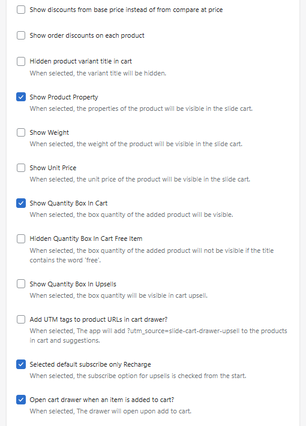
Show Discounts from Base Price
Calculates discounts from base price instead of compare price.
Show Order Discounts on Each Product
Displays discounts per item.
Show Order Discounts on Each Product
Displays discounts per item.
Product Display
Add URL to Product Title
Makes product titles clickable.
Hide Variant Title
Hides variant information in cart items.
Show Product Properties
Displays product custom properties.
Show Weight
Displays product weight.
Show Unit Price
Displays unit pricing.
Quantity Controls
Show Quantity Box in Cart
Allows quantity editing in the cart.
Hide Quantity Box for Free Items
Hides quantity for items labeled as free.
Show Quantity Box in Upsells
Enables quantity selection in upsell products.
Advanced Tracking
Add UTM Tags to Product URLs
Adds tracking parameters to product links:
-
Example:
utm_source=slide-cart-drawer-upsell
Subscription Settings
Selected Default Subscribe (Recharge)
Pre-selects subscription option in upsells.
Show Subscription Option in Cart (BETA)
Displays subscription options in cart.
Show Subscription Option in Upsell
Displays subscription options in upsell items.
Product Image Settings
Product Image Quality
Controls image resolution:
- Small → fastest
- Compact → balanced
- Medium / Large → higher quality
- 1024 / 2048 → high resolution
Higher quality = slower loading time
Product Image Container
Defines the display size of product images.
- Example: Medium
How It Works
This section acts as a global configuration layer:
- Affects cart behavior
- Controls pricing display
- Adjusts UI elements
- Enables advanced features
All changes here impact the entire cart experience.
Summary
The Cart Settings section allows you to:
- Fully customize cart behavior
- Control pricing, discounts, and display
- Enable advanced features like subscriptions and tracking
- Optimize performance and user experience
It is the most flexible and powerful configuration area in the app.


