Slide Cart Footer Properties
The Slide Cart Footer Properties section allows you to customize the appearance and content of the cart footer.
This area typically contains:
- Subtotal
- Discounts
- Shipping messages
- Checkout actions
General Tab
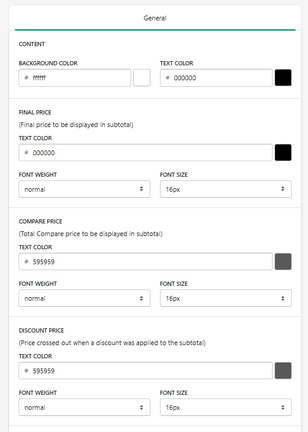
Content Styling
Background Color
Defines the background color of the footer.
- Example: #ffffff
Text Color
Defines the default text color in the footer.
- Example: #000000
Final Price (Subtotal)
This is the main price displayed in the cart.
Text Color
Defines subtotal color.
Font Weight
Defines thickness.
Font Size
Defines size.
- Example: 16px
Compare Price
Displays the original subtotal before discount.
Text Color
Defines compare price color.
- Example: #595959
Font Weight / Size
Controls appearance.
Discount Price
Displays the crossed-out price when a discount is applied.
Text Color
Defines discount price color.
Font Weight / Size
Controls styling.
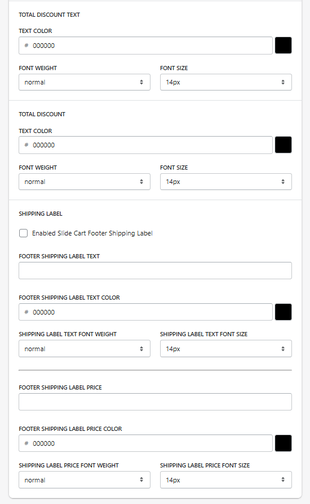
Total Discount Text
Text Color
Defines label color (e.g., “You saved”).
Font Weight / Size
Controls appearance.
Total Discount
Displays the total discount amount.
Text Color
Defines discount value color.
Font Weight / Size
Controls styling.
Shipping Label
This section allows you to display a shipping message in the footer.
Enable Shipping Label
When enabled:
- A shipping message is displayed in the footer
Footer Shipping Label Text
Defines the message.
-
Example:
Free shipping on orders over $50
Text Color
Defines label color.
Font Weight / Size
Controls appearance.
Shipping Label Price
Price Text
Defines the value shown with the label.
Price Color
Defines color.
Font Weight / Size
Controls styling.
How It Works
The footer dynamically updates based on:
- Cart subtotal
- Applied discounts
- Shipping rules
It acts as the final summary before checkout.
Best Practices
- Keep pricing clear and readable
- Highlight savings with color contrast
- Use shipping messages to increase AOV
- Maintain visual consistency
Summary
The Footer Properties section allows you to:
- Customize cart summary display
- Style subtotal, discounts, and savings
- Add promotional shipping messages
- Optimize final conversion stage
It is the final visual and informational step before checkout.

