Gift Wrap
The Gift Wrap feature allows you to offer a gift wrapping service directly in the slide cart.
You can configure it as:
- A paid add-on
- A free option (depending on product setup)
This feature enhances the customer experience and creates an additional revenue opportunity.
Feature Status
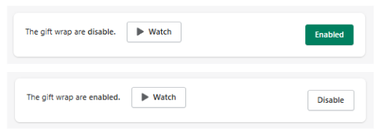
At the top of the section:
- Enabled → Gift wrap option is available in the cart
- Disabled → Gift wrap is hidden
Important Notice
Gift wrap will only be shown for available products
This means:
- The feature depends on product availability
- It will not appear if conditions are not met
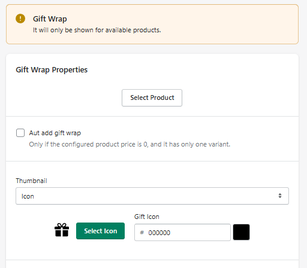
Gift Wrap Properties
Select Product
Choose the product that will be used as the gift wrap service.
Auto Add Gift Wrap
When enabled:
- The gift wrap is automatically added to the cart
Only works if:
- The product price is 0
- The product has only one variant
Thumbnail
Thumbnail Type
Defines how the gift wrap is displayed visually.
- Example: Icon
Gift Icon
Allows you to select and customize the icon.
Icon Color
Defines the color of the icon.
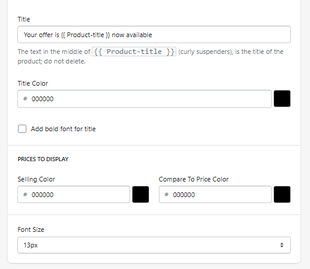
Title
Title Text
Defines the message shown to the customer.
-
Example:
Your offer is {{ Product-title }} now available
Do not remove
{{ Product-title }}, as it dynamically displays the product name.
Title Color
Defines the color of the title text.
Add Bold Font for Title
Applies bold styling to the title.
Pricing Display
Selling Color
Defines the color of the main price.
Compare To Price Color
Defines the color of the compare price (if applicable).
Font Size
Defines the size of the price text.
- Example: 13px
How It Works
- The customer adds a product to the cart
- The gift wrap option appears (if conditions are met)
-
The customer can:
- manually select it
- or receive it automatically (if enabled)
- The gift wrap is added as a product to the cart
How It Works
- The customer adds a product to the cart
- The gift wrap option appears (if conditions are met)
-
The customer can:
- manually select it
- or receive it automatically (if enabled)
- The gift wrap is added as a product to the cart


