Cart Empty
The Cart Empty section allows you to configure the behavior and content that will be displayed when the cart is empty.
Feature Status
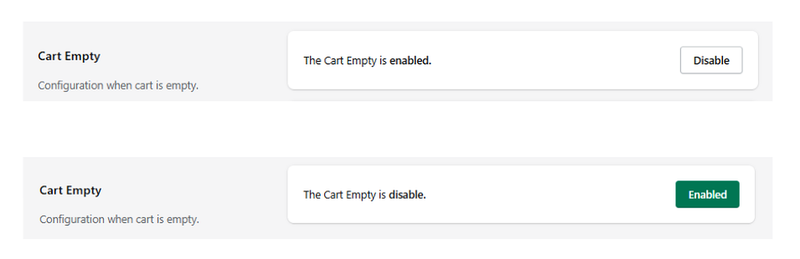
At the top, the current status of the module is displayed:
- The Cart Empty is enabled → the empty cart configuration is active.
- The Disable button allows you to turn off this functionality at any time.
When this option is enabled, the empty cart can be used as a space to display recommendations, messages, and promotional elements.
Configuration Tabs
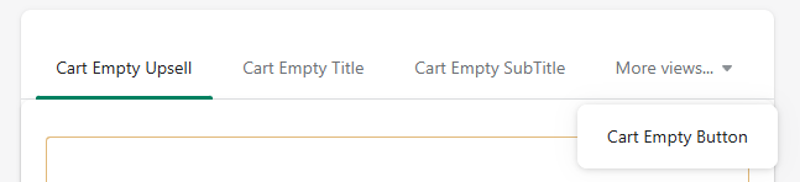
This section includes multiple tabs to customize different parts of the empty cart:
- Cart Empty Upsell
- Cart Empty Title
- Cart Empty SubTitle
- Cart Empty Button
This indicates that the module is not limited to displaying suggested products, but also allows you to configure text and additional views to enhance the experience when the cart is empty.
Cart Empty Upsell
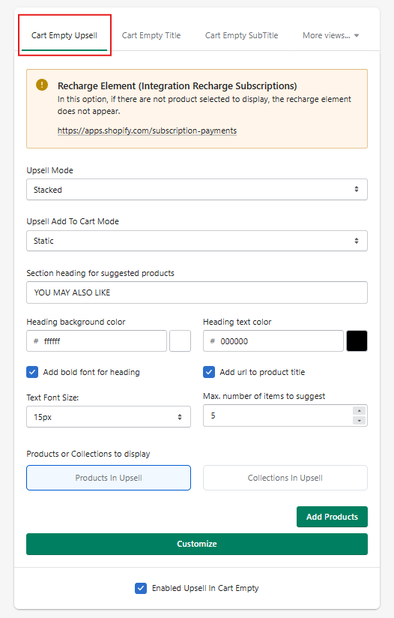
The Cart Empty Upsell section allows you to display product recommendations when the cart is empty.
Its purpose is to keep users engaged and guide them toward adding products instead of leaving the store.
Integration Notice
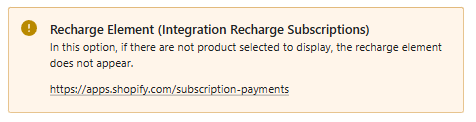
At the top of this section, a notice related to Recharge Subscriptions may appear:
* If no products are selected to display, the Recharge element will not appear.
This means that certain integrations depend on having products configured in this section.
If no products are added, some elements may not be visible.
Configuration Options
Upsell Mode
Defines how the recommended products are displayed.
- Stacked → Products are shown in a vertical list format.
Upsell Add To Cart Mode
Defines how products are added to the cart from this section.
- Static → Uses a standard add-to-cart behavior.
Section Heading for Suggested Products
Allows you to define the title displayed above the recommended products.
- Example: YOU MAY ALSO LIKE
Heading Background Color
Sets the background color of the section header.
Heading Text Color
Sets the text color of the section header.
Add Bold Font for Heading
Enables bold styling for the section title.
Add URL to Product Title
Makes product titles clickable, redirecting users to the product page.
Text Font Size
Defines the font size used in the section.
- Example: 15px
Max. Number of Items to Suggest
Defines the maximum number of recommended products to display.
- Example: 5 items
Products or Collections to Display
You can choose the source of the recommendations:
- Products in Upsell → Manually selected products
- Collections in Upsell → Products pulled from a collection
Add Products
Use the Add Products button to select and include products in the upsell section.
Customize
The Customize button allows further visual or layout customization of the upsell block.
Enable Upsell in Cart Empty
At the bottom, you can enable or disable this feature:
- Enabled Upsell in Cart Empty → Activates the upsell section when the cart is empty.
If disabled, no recommended products will be displayed in the empty cart.
Summary
The Cart Empty Upsell feature transforms an empty cart into an opportunity to:
- Display relevant product recommendations
- Encourage users to continue browsing
- Increase the likelihood of adding items to the cart
Instead of showing an empty state with no interaction, this feature keeps the shopping experience active and conversion-focused.
Cart Empty Title
This text is the first element users see, making it important for setting context and guiding user behavior.
Configuration Options
Title Text
Defines the main message shown in the empty cart.
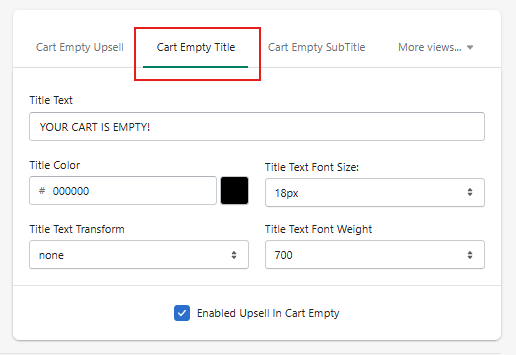
- Example: YOUR CART IS EMPTY!
This text should clearly communicate the current state and can be used to encourage users to continue shopping.
Title Color
Defines the main message shown in the empty cart.
- Example: YOUR CART IS EMPTY!
This text should clearly communicate the current state and can be used to encourage users to continue shopping.
Title Text Font Size
Defines the size of the title text.
- Example: 18px
Larger sizes increase visibility and emphasis.
Title Text Transform
Controls the text formatting style.
- none → Default text
- Other options may include uppercase or lowercase formatting
This helps standardize the appearance of the title.
Title Text Font Weight
Defines the thickness of the text.
- Example: 700 (bold)
Higher values make the title more prominent.
Enable Upsell in Cart Empty
At the bottom, the option:
- Enabled Upsell in Cart Empty
This toggle controls whether upsell content (product recommendations) is displayed alongside the empty cart message.
* If disabled, only the title (and other empty cart content) will be shown without product suggestions.
Summary
The Cart Empty Title section allows you to:
- Define the main empty cart message
- Customize its appearance (color, size, weight, format)
- Align the message with your store’s branding
A well-designed title helps clearly communicate the cart status while encouraging users to continue browsing and adding products.
Cart Empty Subtitle
The Cart Empty Subtitle section allows you to define a secondary message displayed below the main empty cart title.
This text provides additional context and can be used to guide users toward taking action.
Configuration Options
Subtitle Text
Defines the supporting message shown under the main title.
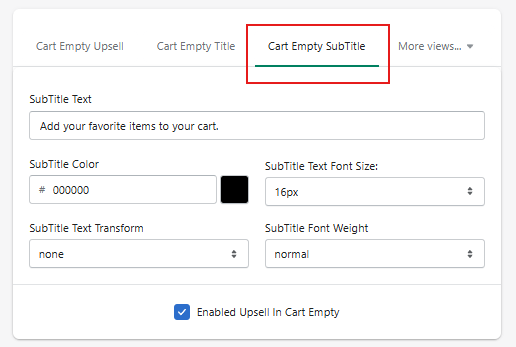
- Example: Add your favorite items to your cart.
This text is typically used to encourage users to continue browsing or start adding products.
Subtitle Color
Sets the color of the subtitle text.
- Example: #000000
Allows visual consistency with your store’s design.
Subtitle Text Font Size
Defines the size of the subtitle text.
- Example: 16px
Usually smaller than the title, but still clearly readable.
Subtitle Text Transform
Controls the formatting of the text.
- none → Default formatting
- Other options may include uppercase or lowercase
Subtitle Font Weight
Defines the thickness of the subtitle text.
- Example: normal
This is typically lighter than the main title to maintain visual hierarchy.
Enable Upsell in Cart Empty
At the bottom, the option:
- Enabled Upsell in Cart Empty
This setting controls whether product recommendations are displayed together with the subtitle and title.
* If disabled, only the empty cart messages will be shown without upsell content.
Summary
The Cart Empty Subtitle section allows you to:
- Add a secondary message to support the empty cart state
- Guide users toward taking action
- Customize its visual style (color, size, weight, format)
Combined with the title and upsell modules, the subtitle helps create a more complete and engaging empty cart experience.
Summary
The Cart Empty Subtitle section allows you to:
- Add a secondary message to support the empty cart state
- Guide users toward taking action
- Customize its visual style (color, size, weight, format)
Combined with the title and upsell modules, the subtitle helps create a more complete and engaging empty cart experience.
Cart Empty Button
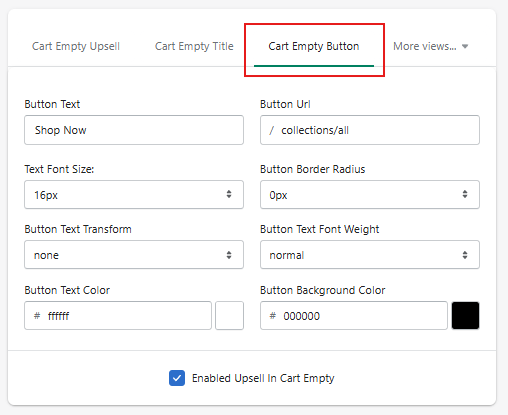
The Cart Empty Button section allows you to configure a call-to-action (CTA) button displayed when the cart is empty.
This button is essential to guide users back into the shopping flow.
Configuration Options
Button Text
Defines the label displayed on the button.
- Example: Shop Now
This should be a clear and action-oriented message.
Button URL
Defines where the user will be redirected after clicking the button.
- Example: /collections/all
This typically links to a collection, homepage, or any relevant shopping page.
Text Font Size
Defines the size of the button text.
- Example: 16px
Button Border Radius
Controls the roundness of the button corners.
- Example: 0px → square corners
- Higher values → more rounded corners
Button Text Transform
Controls the formatting of the button text.
- none → default formatting
- Other options may include uppercase or lowercase
Button Text Font Weight
- Example: normal
Button Text Color
- Example: #ffffff
Button Background Color
Sets the background color of the button.
- Example: #000000
This should contrast well with the text color for readability.
Enable Upsell in Cart Empty
At the bottom, the option:
- Enabled Upsell in Cart Empty
Controls whether upsell content is displayed together with the button and empty cart messages.
Summary
The Cart Empty Button allows you to:
- Add a clear call-to-action when the cart is empty
- Redirect users to a relevant shopping page
- Customize the button’s visual style (text, colors, size, shape)
This element plays a key role in re-engaging users and encouraging them to continue browsing and adding products.