Tiered Free Items (BETA)
The Tiered Free Items feature allows you to offer free products based on cart conditions, such as total value or quantity.
This system is designed to incentivize higher spending by unlocking free items when customers reach specific thresholds.
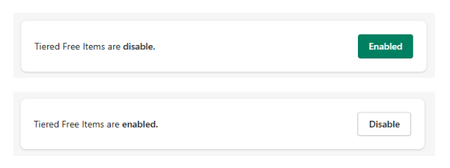
Feature Status
At the top of the section:
- Enabled → Tiered free items are active
- Disabled → No free item rewards are displayed
Important Requirement
To display free items correctly, you must configure the offer in Shopify Automatic Discounts.
This ensures that the free product is applied properly at checkout.
Display Settings
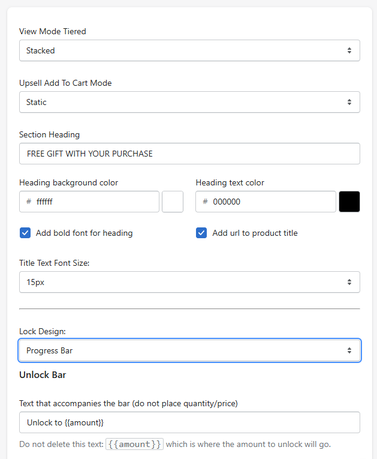
View Mode Tiered
- Stacked → vertical layout
- Slide → horizontal slider
Upsell Add To Cart Mode
- Static → direct add
- Modal → opens selection modal
Section Heading
- Example: FREE GIFT WITH YOUR PURCHASE
Heading Styles
- Background color
- Text color
- Bold font option
- Font size
Lock Design
Defines how locked rewards are displayed.
- Example: Progress Bar
This section controls the progress bar that indicates how close the user is to unlocking a reward.
Progress Text
- Example:
- Unlock to {{amount}}
Do not remove
{{amount}}, as it dynamically displays the required value.
Defines how progress is displayed (e.g., total amount remaining).
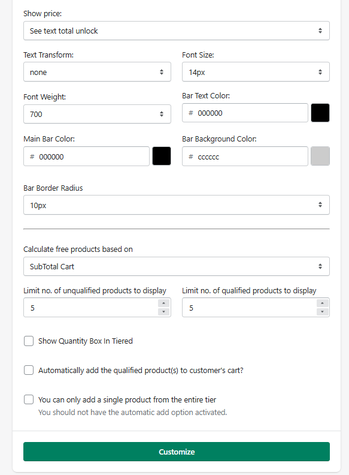
Text Styling
- Font size
- Font weight
- Text transform
- Text color
Bar Styling
- Main bar color
- Background color
- Border radius
Calculation Settings
Defines how eligibility is calculated:
- Subtotal Cart → based on total cart value
Limits
- Limit number of unqualified products to display
- Limit number of qualified products to display
These control how many items are shown before and after unlocking.
Allows users to select quantity for free items.
When enabled:
- Free items are automatically added to the cart
Single Product Selection Restriction
- The user can only select one product from the tier
Should not be used together with automatic add.
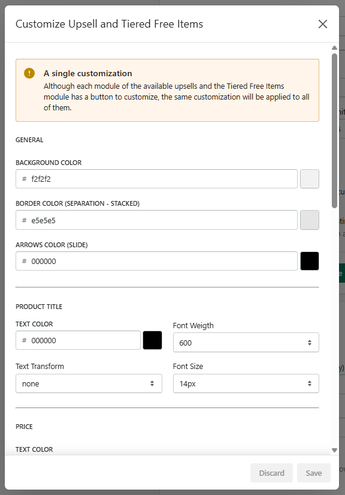
Global Customization Notice
A single customization applies to all modules
Although each upsell and Tiered Free Items module includes its own Customize button, all visual settings configured here are applied globally.
This means:
- Changes will affect all upsell components
- Changes will also apply to Tiered Free Items
- Individual module styling cannot be separated
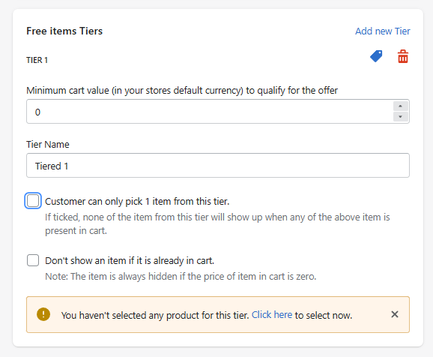
This is where the reward logic is defined.
Create Tier
Each Tier represents a reward level.
Minimum Cart Value
- Example: $100
Tier Name
- Example: Tier 1
Allows only one product to be selected from the tier.
Prevents showing products already added to the cart.
Product Selection
You must assign products to each tier.
If no products are selected, the tier will not function.
How It Works
- The user adds products to the cart
- The system tracks cart value or conditions
- Progress is displayed via a progress bar
- When a threshold is reached → a free item is unlocked
- The user can select or automatically receive the item
Use Cases
- Free gift over $X
- Tiered rewards (e.g., spend more → better gift)
- Promotional campaigns
- Seasonal offers
Summary
The Tiered Free Items feature allows you to:
- Create multi-level reward systems
- Offer free products based on cart conditions
- Use progress bars to drive higher spending
- Automate or control reward selection
- Fully customize design and behavior
It is one of the most powerful conversion tools in the app, combining gamification + incentives + upselling.


