Minimum Order
The Minimum Order feature allows you to enforce or display a minimum purchase requirement before customers can proceed with checkout.
It helps ensure that orders meet a defined threshold, either by value or quantity.
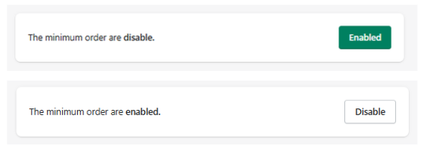
Feature Status
At the top of the section:
- Enabled → Minimum order rules are active
- Disabled → No minimum requirement is applied
Use the toggle button to activate or deactivate this feature.
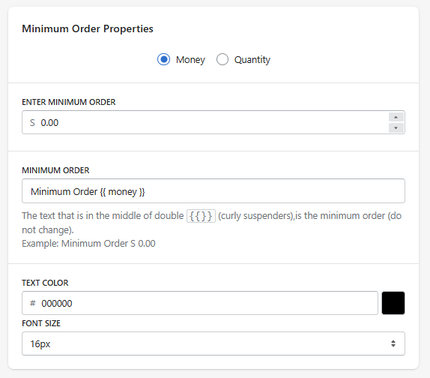
Minimum Order Properties
Rule Type
Defines how the minimum order is calculated:
- Money → based on total cart value
- Quantity → based on number of items
Enter Minimum Order
Defines the minimum threshold required.
- Example (Money): $50.00
- Example (Quantity): 3 items
Minimum Order Message
Message Text
Defines the message shown to the user when the minimum requirement is not met.
-
Example:
Minimum Order {{ money }}
Do not remove
{{ money }}, as it dynamically displays the required amount.
How It Works
- If the cart does not meet the minimum → the message is displayed
- Once the requirement is met → the message is no longer shown
Design Settings
Text Color
Defines the color of the message.
Font Size
Defines the size of the message text.
- Example: 16px
How It Works
- The user adds products to the cart
- The system checks if the minimum requirement is met
- If not → a message is displayed
- Once the condition is satisfied → the restriction is cleared
Summary
The Minimum Order feature allows you to:
- Define a minimum purchase requirement
- Choose between value or quantity conditions
- Display dynamic messages to guide users
- Control order eligibility directly from the cart
It is a useful tool to ensure order profitability and enforce store policies.

