Coupon Bar (Countdown Promotion Bar)
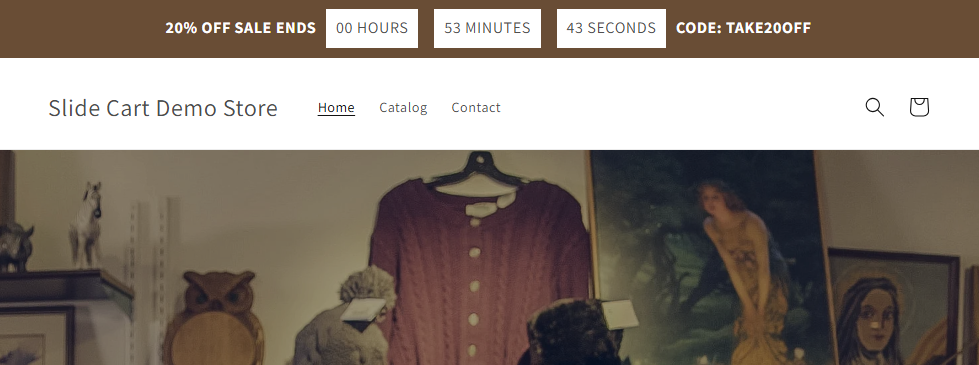
The Coupon Bar allows you to display a promotional message with a countdown timer, creating urgency and encouraging customers to complete their purchase.
Activation
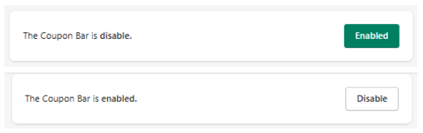
At the top:
- Disabled → Coupon Bar is not visible
- Enabled → Coupon Bar is active
Purpose
This feature is designed to:
- Reduce cart abandonment
- Create urgency
- Highlight discount codes
- Increase conversion rates
Timer Settings
Reservation Time
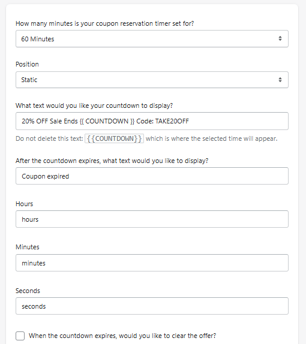
How many minutes is your coupon reservation timer set for?
Defines the countdown duration.
- Example: 60 minutes
Position
Defines how the bar is displayed.
- Example: Static
(Other modes may control floating or dynamic positioning)
Countdown Text
Main Text
What text would you like your countdown to display?
-
Example:
20% OFF Sale Ends {{ COUNTDOWN }} Code: TAKE20OFF
{{ COUNTDOWN }}This variable must not be removed — it displays the remaining time.
Expired Text
After the countdown expires
Defines message after timer ends.
- Example: Coupon expired
Time Labels
Customize how time units are displayed:
- Hours → hours
- Minutes → minutes
- Seconds → seconds
Expiration Behavior
Clear Offer After Expiration
If enabled:
- The promotion is removed when time ends
Design Settings
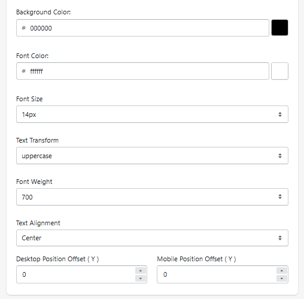
Background Color
Defines bar background.
- Example: #000000
Font Color
Defines text color.
- Example: #ffffff
Font Size
Defines text size.
- Example: 14px
Text Transform
Controls formatting.
- Example: uppercase
Font Weight
Defines thickness.
- Example: 700
Text Alignment
Defines alignment.
- Example: center
Position Offsets
Desktop Offset (Y)
Mobile Offset (Y)
Controls vertical spacing for the bar.
How It Works
- Coupon Bar is displayed with a timer
- Countdown begins
- Customer sees urgency message
-
When time expires:
- Message updates (or disappears if configured)
Use Cases
- Flash sales
- Limited-time coupons
- Exit-intent urgency
- Promotional campaigns
Best Practices
- Use clear, short messaging
- Highlight discount code visibly
- Keep timer realistic (not too long)
- Use strong contrast colors
What to Avoid
- Fake urgency (hurts trust)
- Overly long timers
- Cluttered text
Summary
The Coupon Bar allows you to:
- Display time-limited promotions
- Add urgency with countdown
- Highlight discount codes
- Improve conversion rates