Terms and Conditions
The Terms and Conditions feature allows you to require customers to accept your store’s terms before proceeding to checkout.
This ensures compliance and helps protect your business by making users explicitly agree to your policies.
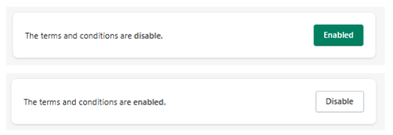
Feature Status
At the top of the section:
- Enabled → Customers must accept the terms before checkout
- Disabled → No acceptance is required
Purpose
This feature is used to:
- Enforce legal agreement before purchase
- Ensure customers acknowledge store policies
- Reduce disputes and misunderstandings
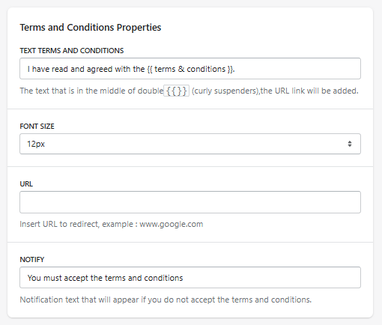
Terms and Conditions Properties
Terms Text
Defines the message displayed to the user.
-
Example:
I have read and agreed with the {{ terms & conditions }}
Do not remove
{{ terms & conditions }}, as it will automatically include the link.
How It Works
-
The text inside
{{ }}becomes a clickable link - The link redirects to the URL defined below
Font Size
Defines the size of the text.
- Example: 12px
URL
Defines the destination of the terms and conditions link.
-
Example:
https://yourstore.com/pages/terms-and-conditions
Notify Message
Defines the message shown if the user tries to proceed without accepting the terms.
-
Example:
You must accept the terms and conditions
How It Works
- The user opens the cart
- The terms checkbox is displayed
- The user must accept the terms
- If not accepted → checkout is blocked
- If accepted → user can proceed
Important Notes
- The feature blocks checkout until accepted
- Requires a valid URL to function correctly
-
The link is dynamically inserted via
{{ terms & conditions }}
Summary
The Terms and Conditions feature allows you to:
- Require user agreement before checkout
- Display a customizable legal message
- Link directly to your policies
- Prevent checkout without acceptance
It is an essential feature for legal protection and policy enforcement.

