Rewards
The Rewards feature allows you to create incentive-based promotions that encourage customers to increase their cart value.
It works by defining goals (e.g., free shipping, discounts, gifts) that are unlocked when the customer reaches a specific condition.
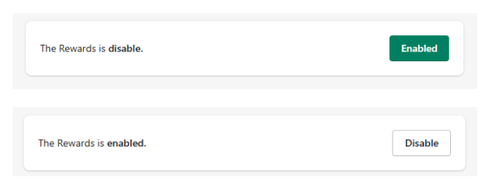
Feature Status
At the top of the section:
- Enabled → Rewards are active in the cart
- Disabled → Rewards are not displayed
Use the toggle button to activate or deactivate the feature.
General Settings
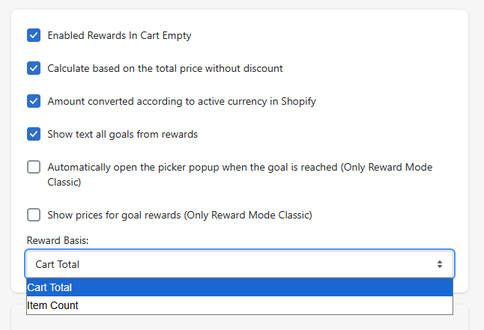
Enabled Rewards in Cart Empty
Allows rewards to be displayed even when the cart is empty.
Calculate Based on Total Price Without Discount
- When enabled → rewards are calculated using the original cart value
- When disabled → rewards are calculated after discounts
Automatically adjusts reward thresholds based on the store’s active currency.
Show Text All Goals from Rewards
Displays all reward goals to the user, even if they are not yet reached.
Automatically Open Picker Popup (Classic Mode Only)
Opens a selection popup automatically when a reward is unlocked.
Show Prices for Goal Rewards (Classic Mode Only)
Displays pricing details for each reward level.
Reward Basis
Defines how reward progress is calculated:
- Cart Total → based on total cart value
- Item Count → based on number of items
Rewards Configuration
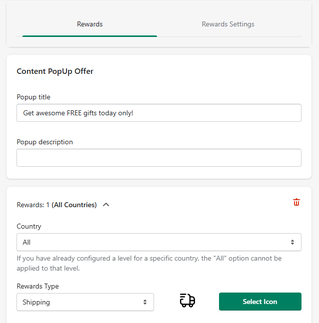
Content Popup Offer
Popup Title
Defines the title shown in the reward popup.
- Example: Get awesome FREE gifts today only!
Optional text displayed inside the popup.
Reward Rules
You can configure rewards per country or globally.
Country
Defines where the reward applies.
- Example: All Countries
Rewards Type
Defines the type of reward:
- Shipping
- Discount
- Other reward types (depending on configuration)
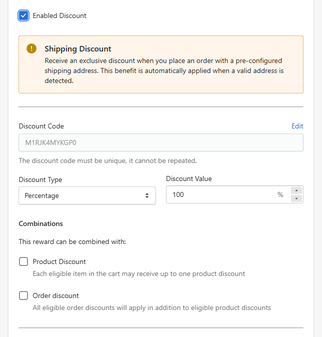
Enabled Discount
Activates the reward discount.
Discount Code
Defines the discount applied when the reward is unlocked.
The discount code must be unique.
Discount Type
Defines how the discount is calculated:
- Percentage
- Fixed amount
Discount Value
Defines the value of the reward.
- Example: 100% (free shipping)
Combinations
Defines whether the reward can be combined with:
- Product discounts
- Order discounts
Reward Messaging
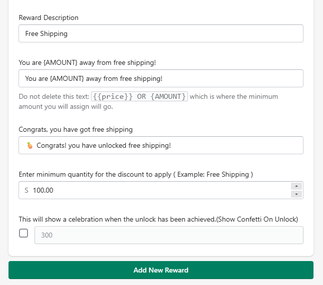
Reward Description
Defines the label of the reward.
- Example: Free Shipping
Progress Text
Defines the message shown while the reward is not yet reached.
-
Example:
You are [AMOUNT] away from free shipping!
Do not remove placeholders like
[AMOUNT].
Success Text
Defines the message shown when the reward is unlocked.
-
Example:
Congrats, you have unlocked free shipping!
Minimum Requirement
Defines the condition required to unlock the reward.
- Example: $100
Celebration Effect
Option to show a visual celebration (e.g., confetti) when the reward is unlocked.
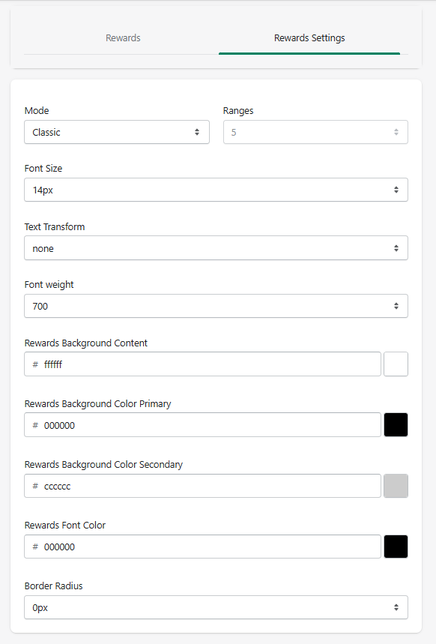
Rewards Settings (Design)
Mode
Defines how rewards are displayed.
- Example: Classic
Ranges
Defines how many reward levels are displayed.
Font Size
Controls text size.
Text Transform
Controls text formatting.
Font Weight
Defines text thickness.
Rewards Background Content
Defines the background color of the rewards container.
Rewards Background Color Primary
Defines the main color of the progress indicator.
Rewards Background Color Secondary
Defines the secondary or inactive color.
Rewards Font Color
Defines text color.
Border Radius
Controls corner roundness.
How It Works
When enabled, the Rewards system:
- Tracks user progress (cart value or item count)
- Displays progress toward goals
- Unlocks rewards automatically when conditions are met
- Updates messaging dynamically
This creates a gamified experience that encourages users to spend more.
Summary
The Rewards feature allows you to:
- Create spending incentives
- Increase average order value (AOV)
- Display progress toward rewards
- Unlock discounts automatically
- Customize both logic and design
It is one of the most powerful tools to drive higher conversions and revenue directly from the cart.


