Manually Select Upsell Products
The Manually Select Upsell Products feature allows you to create custom product recommendations based on your own strategy.
Unlike automatic recommendations, this module gives you full control over:
- which products are suggested
- when they appear
- how they are displayed
Feature Status
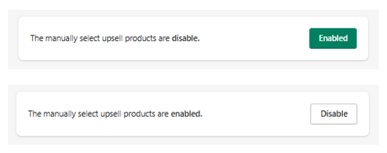
At the top of the section:
- Enabled → Manual upsell recommendations are active
- Disabled → No manual upsells are displayed
Use the toggle button to activate or deactivate this feature.
Setup Upsell Products
Click Setup Upsell Products to configure your upsell strategy through Upsell Groups.
This section works based on the creation and management of Upsell Groups, where each group defines a specific upsell rule.
Display Settings
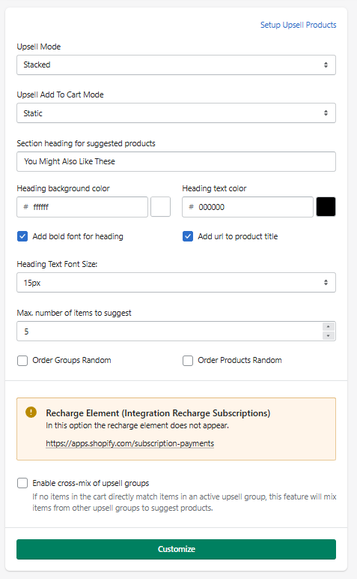
Defines how upsell products are displayed:
- Stacked → vertical list
- Slide → horizontal slider
- Static → direct add-to-cart
- Modal → opens a selection modal (e.g., variants)
Defines the title displayed above the upsell block.
- Example: You Might Also Like These
Sets the background color of the section header.
Sets the text color of the section header.
Applies bold styling to the section title.
Makes product titles clickable, linking to the product page.
Defines the size of the section title.
- Example: 15px
Defines how many upsell products will be displayed.
- Example: 5
When enabled:
- Upsell groups are displayed in random order
When enabled:
- Products within a group are randomized
Integration Notice
Recharge Subscriptions
If no products are selected, the Recharge element will not appear.
This indicates that certain integrations depend on having configured upsell items.
Advanced Option
- Products from different upsell groups can be mixed together
- Suggestions become more dynamic and flexible
Customize
The Customize button allows you to adjust the visual appearance of the upsell block (shared with global customization settings).
How It Works
Manual upsells operate based on predefined logic:
- You define trigger products (what the user adds to cart)
- You assign recommended products (what should be suggested)
- The system displays those recommendations in the cart
This gives you full control over the upsell strategy.
Summary
The Manually Select Upsell Products feature allows you to:
- Create fully controlled upsell strategies
- Define custom product relationships
- Override automatic recommendations
- Optimize cross-sell and bundle opportunities
It is the most powerful and flexible upsell system in the app, ideal for merchants who want precise control over public relations.

