Countdown
The Countdown feature allows you to add a timer inside the cart to create urgency and encourage faster purchasing decisions.
This feature is designed to reduce cart abandonment by giving users a limited time to complete their purchase.
Feature Status
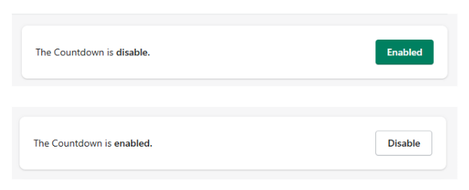
At the top of the section, you can control the module:
- Enabled → The countdown is active and visible in the cart
- Disabled → The countdown is not displayed
Use the button to toggle the feature on or off at any time.
Configuration Options
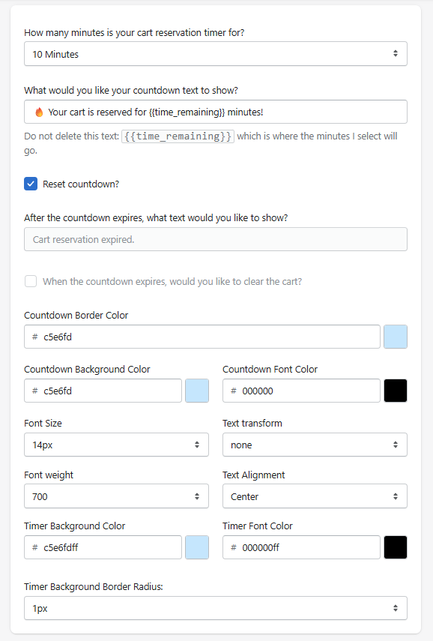
Cart Reservation Time
Defines how long the cart is reserved before the timer expires.
- Example: 10 minutes
This value determines the urgency window for the user.
Countdown Text
Defines the message displayed alongside the timer.
- Example:
Your cart is reserved for {{time_remaining}} minutes!
Do not remove {{time_remaining}}, as it dynamically displays the remaining time.
Reset Countdown
- When enabled, the timer resets under certain conditions (e.g., user interaction).
This helps maintain urgency while allowing flexibility in user behavior.
Expiration Text
- Example: Cart reservation expired.
Clear Cart on Expiration
- If enabled → Cart items are removed after expiration
- If disabled → Cart remains unchanged
Design Settings
Font Size
Controls the size of the text.
- Example: 14px
Text Transform
Controls text formatting (e.g., uppercase, lowercase).
Font Weight
Defines text thickness.
- Example: 700 (bold)
Text Alignment
Controls text positioning.
- Example: Center
Timer Style
Timer Background Color
Defines the background color of the timer element.
Timer Font Color
Defines the color of the timer numbers.
Timer Border Radius
Controls how rounded the timer container appears.
- Example: 1px
How It Works
When enabled, the countdown appears in the cart and starts running as soon as the user interacts with it.
- Displays remaining time dynamically
- Reinforces urgency
- Encourages faster checkout decisions
If the timer expires:
- A custom message is shown
- Optional: the cart can be cleared automatically
Summary
The Countdown feature helps you:
- Create urgency in the cart
- Reduce abandonment rates
- Push users toward faster checkout
It is a powerful psychological trigger that, when used correctly, can significantly improve conversion rates.