Continue Shopping
The Continue Shopping feature allows you to display a button inside the slide cart that lets users return to browsing your store.
This button helps maintain the shopping flow by giving users an easy way to continue exploring products.
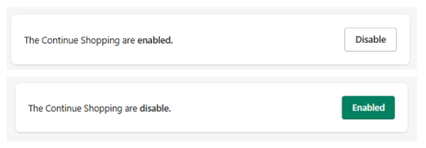
Feature Status
At the top of the section:
- Enabled → The “Continue Shopping” button is visible in the cart
- Disabled → The button is hidden
Use the toggle button to activate or deactivate this feature.
Behavior
- If a link is provided → the button redirects users to that specific page
- If no link is provided → the button will simply close the slide cart
This allows flexible behavior depending on your store setup.
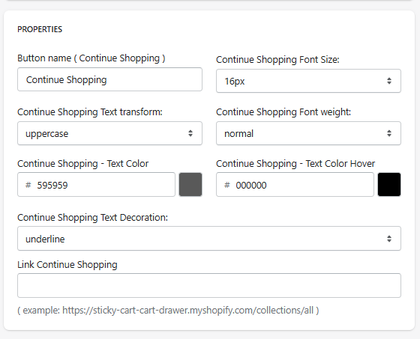
Properties
Button Name
Defines the label displayed on the button.
- Example: Continue Shopping
Font Size
Defines the size of the button text.
- Example: 16px
Text Transform
Controls text formatting.
- Example: uppercase
Font Weight
Defines the thickness of the text.
- Example: normal
Text Color
Defines the default color of the button text.
- Example: #595959
Text Color (Hover)
Defines the color when hovering over the button.
- Example: #000000
Text Decoration
Defines additional styling for the text.
- Example: underline
Link Continue Shopping
Defines the destination URL when the button is clicked.
-
Example:
https://your-store.myshopify.com/collections/all
How It Works
When enabled:
- The button appears inside the cart
- The user clicks the button
-
The system either:
- redirects to the defined URL, or
- closes the cart (if no URL is set)
Summary
The Continue Shopping feature allows you to:
- Add a navigation option to keep users browsing
- Control whether the button redirects or closes the cart
- Customize text, styling, and behavior
It is a simple but effective tool to maintain engagement and keep users inside the shopping journey.

