Checkout Button
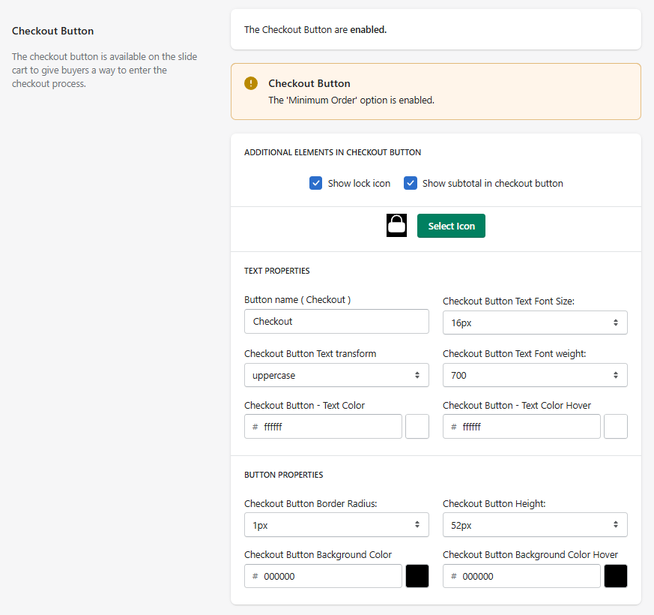
The Checkout Button section allows you to configure the main call-to-action (CTA) that directs users to the checkout process.
This button is one of the most important elements in the cart, as it represents the final step before purchase.
Feature Status
At the top of the section:
- Enabled → The checkout button is active in the cart
- Disabled → The checkout button is not displayed
Important Notice
The Minimum Order option is enabled
If the Minimum Order feature is active:
- The checkout button may be restricted
- Users may not proceed until conditions are met
Additional Elements
Show Lock Icon
Displays a lock icon inside the checkout button.
- Reinforces security and trust
Show Subtotal in Checkout Button
Displays the cart subtotal inside the button.
- Provides immediate price visibility
- Helps users confirm their purchase amount
Select Icon
Allows you to choose a custom icon for the button.
Text Properties
Button Name
Defines the label of the button.
- Example: Checkout
Text Font Size
Defines the size of the button text.
- Example: 16px
Text Transform
Controls text formatting.
- Example: uppercase
Font Weight
Defines text thickness.
- Example: 700 (bold)
Text Color
Defines the color of the button text.
Text Color (Hover)
Defines the text color when hovering over the button.
Button Properties
Border Radius
Controls how rounded the button corners are.
- Example: 1px
Button Height
Defines the height of the button.
- Example: 52px
Background Color
Defines the default background color of the button.
Background Color (Hover)
Defines the background color when hovering over the button.
How It Works
When enabled, the checkout button:
- Displays as the main CTA in the cart
- Reflects configured styles and content
- Allows users to proceed to checkout
If Minimum Order is active:
- The button may be restricted until conditions are met
Summary
The Checkout Button feature allows you to:
- Customize the main purchase CTA
- Add trust elements (icons, subtotal)
- Control typography and styling
- Align the button with your store branding
It is the final and most critical step in the conversion funnel, directly impacting checkout completion rates.
