Cart Note
The Cart Note feature allows you to add a note field inside the slide cart, enabling customers to include special instructions with their order.
This is useful for collecting additional information such as delivery notes, gift messages, or custom requests.
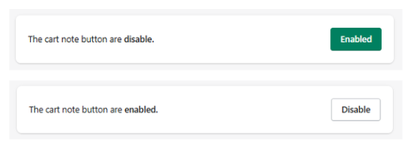
Feature Status
At the top of the section:
- Enabled → The cart note field is visible
- Disabled → The cart note feature is hidden
Behavior
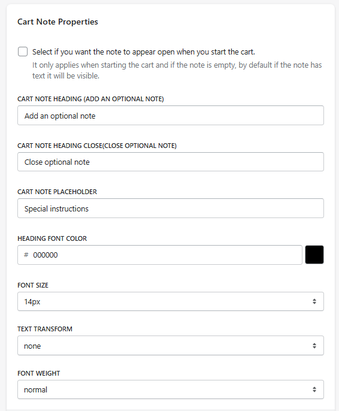
Open Note by Default
When enabled:
- The note field will be automatically open when the cart is first displayed
- Applies only if the note is empty
If the note already contains text, it will remain visible.
Cart Note Properties
Cart Note Heading (Open)
Defines the label used to open the note field.
- Example: Add an optional note
Cart Note Heading (Close)
Defines the label used to close the note field.
- Example: Close optional note
Cart Note Placeholder
Defines the placeholder text inside the input field.
- Example: Special instructions
Heading Font Color
Defines the color of the heading text.
Font Size
Defines the size of the text.
- Example: 14px
Text Transform
Controls text formatting.
- Example: none
Font Weight
Defines text thickness.
- Example: normal
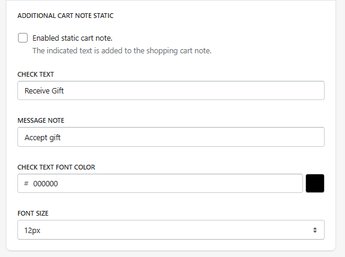
Additional Cart Note (Static)
This option allows you to add a predefined message or checkbox that appends text to the cart note.
Enable Static Cart Note
When enabled:
- A predefined message can be added automatically to the cart note
Check Text
Defines the label shown next to the checkbox.
- Example: Receive Gift
Message Note
Defines the text that will be added to the cart note when selected.
- Example: Accept gift
Check Text Font Color
Defines the color of the checkbox label.
Font Size
Defines the size of the checkbox text.
- Example: 12px
How It Works
- The user opens the cart
- The note field is displayed (collapsed or expanded)
- The user enters custom instructions
- Optionally selects predefined messages
- The note is saved with the order
Summary
The Cart Note feature allows you to:
- Collect custom information from customers
- Add optional or predefined notes
- Customize text and styling
- Improve communication and order accuracy
It is a flexible tool that enhances the checkout experience and supports personalized orders.


