Automatic Product Recommendations
The Automatic Product Recommendations feature displays suggested products inside the cart based on an algorithm.
These recommendations are generated using:
- product data
- descriptions
- purchase behavior
The goal is to show relevant products that are similar or frequently bought together, increasing the likelihood of additional purchases.
Feature Status
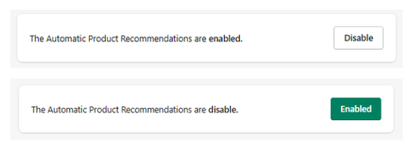
At the top of the section:
- Enabled → Automatic recommendations are active
- Disabled → No automatic suggestions are shown
Use the toggle button to activate or deactivate the feature.
Exclusion Rule
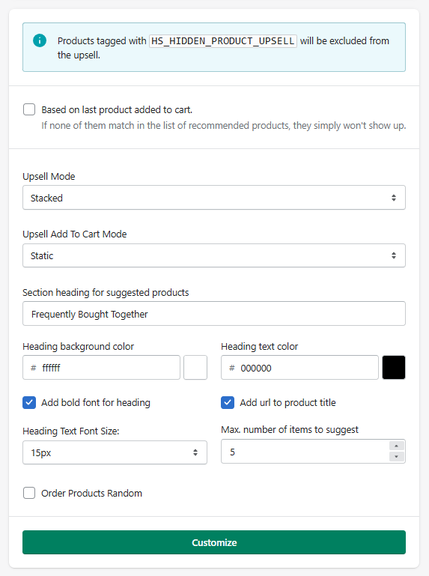
Products tagged with:
- HS_HIDDEN_PRODUCT_UPSELL
will be automatically excluded from appearing in recommendations.
This allows you to control which products should not be promoted in upsells.
Recommendation Logic
Based on Last Product Added to Cart
When enabled:
- Recommendations are generated based on the most recently added product
If no matching products are found, no recommendations will be displayed.
Display Settings
Upsell Mode
Defines how recommended products are displayed:
- Slide → horizontal slider format
- Stacked → vertical list format
Upsell Add To Cart Mode
Defines how products are added from this section:
- Static → standard add-to-cart behavior
- Modal → opens a modal (e.g., for variant selection)
Section Heading
Defines the title displayed above the recommendations.
- Example: Frequently Bought Together
Makes product titles clickable, linking to the product page.
Defines the size of the section title.
- Example: 15px
Max. Number of Items to Suggest
Defines how many recommended products will be displayed.
- Example: 5
Order Products Random
When enabled:
- The order of recommended products is randomized
Customize
The Customize button allows further customization of the layout and visual behavior of the recommendations block.
How It Works
When enabled, the system:
- Detects products in the cart
- Uses an algorithm to find related or complementary items
- Displays those items inside the cart
- Allows users to add them instantly
This creates a dynamic upsell experience without manual configuration.
Summary
The Customize Upsell & Tiered Free Items section allows you to:
- Apply a unified design across all upsell features
- Control colors, typography, and layout styles
- Maintain consistency in the cart experience
This ensures that all promotional elements align with your store’s branding.
Customize Upsell & Tiered Free Items
The Customize Upsell and Tiered Free Items section allows you to control the visual styling of all upsell components and reward-based free item blocks.
Global Customization
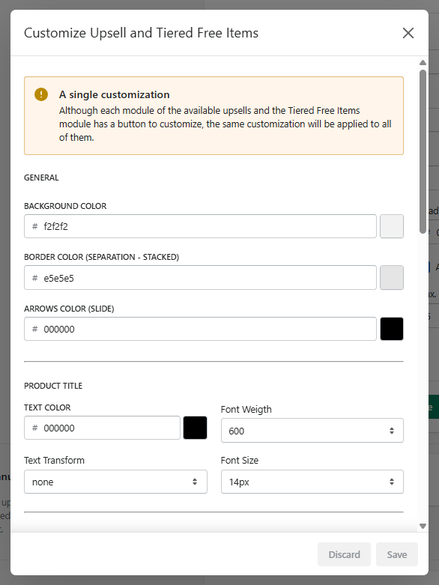
A single customization applies to all modules
All styles configured here will be applied globally to:
- Automatic product recommendations
- Manual upsells
- Tiered rewards / free items
This ensures a consistent visual experience across all promotional elements in the cart.
General Styles
Defines the background color of the upsell container.
Defines the divider color between items when using stacked layout.
Defines the color of navigation arrows when using slider layout.
Product Title
Sets the color of product titles.
Defines the size of the product title.
Price
Defines the color of the product price.
Compare Price
The compare price (original price) is typically displayed as a crossed-out value.
Defines the color of the compare price.
Controls text thickness.
Defines text size.
Sale Price
Enabled Sale Price
When enabled, a sale price will be displayed when a compare price exists.
Defines the color of the sale price.
Controls text thickness.
Defines text size.
Add to Cart Button
Normal State
Defines the button background color.
Defines the button text color.
Defines the size of the button text.
Defines the thickness of the text.
Controls how rounded the button corners are.
- 0px → square
- Higher values → more rounded
Hover State
Defines the background color when hovering over the button.
Defines the text color on hover.
How It Works
This section acts as a global styling system:
- Changes are applied instantly across all upsell modules
- No need to configure each block individually
- Ensures visual consistency and branding alignment
Summary
The Customize Upsell & Tiered Free Items section allows you to:
- Apply consistent styles across all upsell components
- Customize typography, colors, and layout
- Control button appearance and interaction states
- Ensure alignment with your store’s branding
This centralizes all visual customization for upsell-related features into a single configuration panel.


