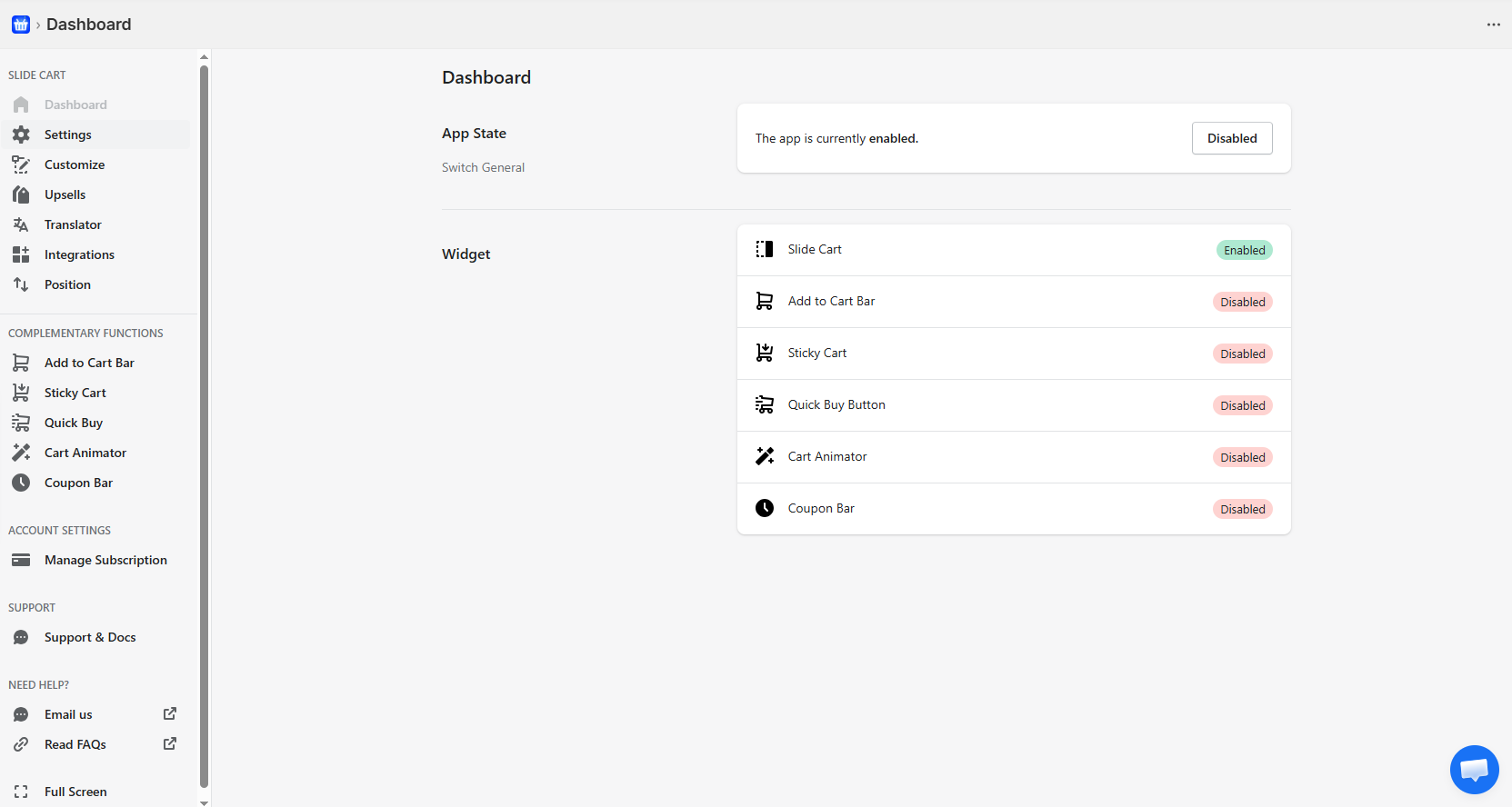
Control Panel
From here, you can manage the overall app status and control the modules that directly impact the store’s shopping experience.
* App General Status
At the top, the global app status is displayed:
- Enabled → The app is active and running on the store.
- Disabled → The app is completely turned off.
The available button allows you to enable or disable the entire application, affecting all modules at the same time.
⚠️ If the app is disabled, none of its features will be visible in the store.
* Modules (Widget Control)
The Dashboard includes a modular activation system.
Each feature can be enabled or disabled independently based on the business needs.
Módulos disponibles:
Slide Cart
Carrito lateral principal que se despliega en la tienda.
- Es el núcleo de la aplicación.
- Permite mostrar productos, promociones, upsells y checkout.
➤ Estado actual: Enabled
Sticky Cart
Floating cart access visible across the entire store.
- Allows opening the cart from any page
- Improves accessibility
➤ Status: Disabled
Quick Buy Button
Quick purchase button on collections or product listings.
- Allows adding products without entering the product page
- Reduces steps in the purchasing process
➤ Status: Disabled
Cart Animator
Visual animations when adding products to the cart.
- Enhances the user experience
- Reinforces the “add to cart” action
➤ Status: Disabled
Coupon Bar
Field or bar to apply discount codes.
- Allows customers to enter coupons directly
- Reduces friction before checkout
➤ Status: Disabled
Navigation Menu
The sidebar organizes all the app’s functionalities:
Main Configuration
- Dashboard → Overview
- Settings → Global settings
- Customize → Design and appearance
- Upsells → Offers and recommendations
- Translator → Translations
- Integrations → External integrations
- Position → Element positioning
Complementary Features
- Add to Cart Bar
- Sticky Cart
- Quick Buy
- Cart Animator
- Coupon Bar
These sections allow you to configure each module in detail once it is activated.
Account & Support
- Manage Subscription → Plan and billing
- Support & Docs → Documentation
- Email us / FAQs → Support
Operating Logic
The application uses a modular and scalable architecture:
- Slide Cart functions as the core component.
- The remaining modules act as optional extensions.
- Each module can be enabled independently without affecting others.
This allows for:
- Flexible configuration based on store needs
- Better performance (only necessary features are used)
- Adaptation to different sales strategies
Best Practices
- Activate Slide Cart first as the foundation.
- Add modules progressively based on your needs.
- Avoid enabling all modules without a clear strategy.