Slide Cart Modal Product Properties
The Slide Cart Modal Product Properties section allows you to customize the appearance of the product modal displayed when a product requires selection before being added to the cart (e.g., variants).
This modal appears when using features like:
- Upsells with modal add-to-cart
- Products with variants
- Quick buy interactions
General Tab
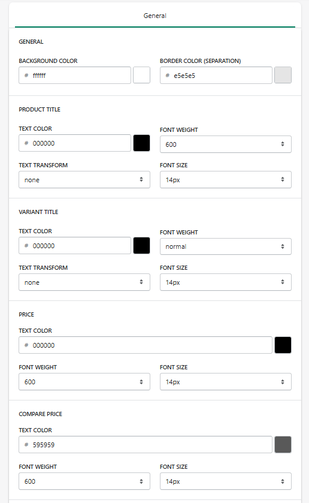
Background & Layout
Background Color
Defines the background color of the modal.
- Example: #ffffff
Border Color (Separation)
Defines divider color between sections.
- Example: #e5e5e5
Product Title
Text Color
Defines the product title color.
Font Weight
Defines thickness.
- Example: 600
Text Transform
Controls formatting.
Font Size
Defines size.
- Example: 14px
Variant Title
Text Color
Defines variant label color.
Font Weight
Defines thickness.
Text Transform
Controls formatting.
Font Size
Defines size.
Price
Text Color
Defines main price color.
Font Weight
Defines thickness.
Font Size
Defines size.
Compare Price
Text Color
Defines original price color.
- Example: #595959
Font Weight / Size
Controls appearance.
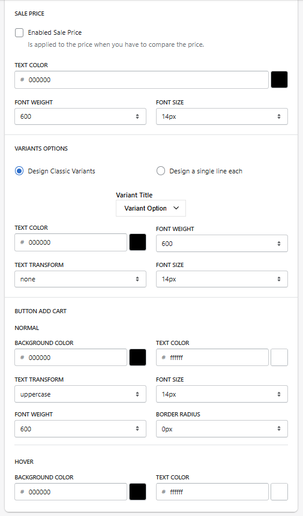
Sale Price
Enable Sale Price
Activates sale price display when applicable.
Text Styling
Controls:
- Color
- Weight
- Size
Variant Options
Variant Display Style
- Design Classic Variants → standard layout
- Single Line Each → cleaner, compact layout
Variant Title Type
Defines how variant names are displayed.
- Example: Variant Option
Variant Text Styling
- Text color
- Font weight
- Text transform
- Font size
Add to Cart Button (Modal)
Normal State
Background Color
Defines button background.
Text Color
Defines button text.
Text Transform
Controls formatting.
- Example: uppercase
Font Size
Defines size.
Font Size
Defines size.
Border Radius
Controls button shape.
Hover State
Background Color
Defines hover background.
Hover State
Background Color
Defines hover background.
How It Works
This modal is triggered when:
- A product requires variant selection
- A modal-based upsell is used
It allows users to:
- Select product options
- Review price
- Add product to cart
Summary
The Modal Product Properties section allows you to:
- Fully customize modal product UI
- Control variant selection experience
- Style pricing and CTA elements
- Improve usability and conversion
It plays a key role in the product selection experience inside the cart and upsells.

