Slide Cart Body & Product Styles
This section allows you to customize the appearance of the cart body and all product-related elements inside the slide cart.
It is divided into three tabs:
- General → global body styles
- Products → product item styling
- Upsells → upsell styling (covered previously)
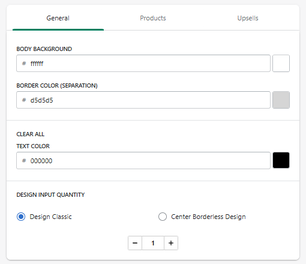
General Tab
Background & Layout
Body Background
Defines the background color of the cart body.
- Example: #ffffff
Border Color (Separation)
Defines the divider color between cart elements.
- Example: #d5d5d5
Clear All Button
Text Color
Defines the color of the "Clear All" action.
- Example: #000000
Design Input Quantity
Defines the style of the quantity selector:
- Design Classic → standard +/- controls
- Center Borderless Design → minimal style
Products Tab
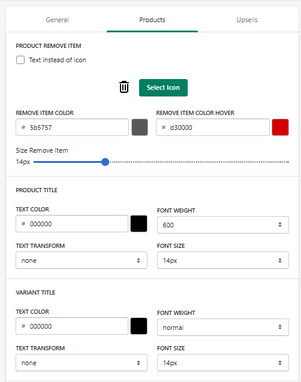
This section controls the styling of each product inside the cart.
Remove Item
Display Mode
- Icon (default)
- Text instead of icon
Remove Item
Display Mode
- Icon (default)
- Text instead of icon
Remove Item Color
Defines the default color.
Remove Item Color (Hover)
Defines hover color.
Icon Size
Controls size of the remove button.
Product Title
Text Color
Defines product name color.
Font Weight
Defines thickness.
Text Transform
Controls formatting.
Font Size
Defines size.
Variant Title
Text Color
Defines variant text color.
Font Weight
Defines thickness.
Text Transform
Controls formatting.
Font Size
Defines size.
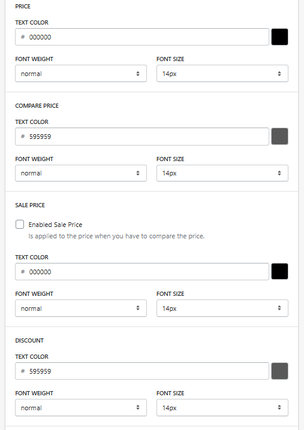
Price
Text Color
Defines main price color.
Font Weight
Defines thickness.
Font Size
Defines size.
Compare Price
Text Color
Defines original price color.
Font Weight
Defines thickness.
Font Size
Defines size.
Sale Price
Enable Sale Price
Activates sale price display when compare price exists.
Text Color / Font / Size
Controls sale price styling.
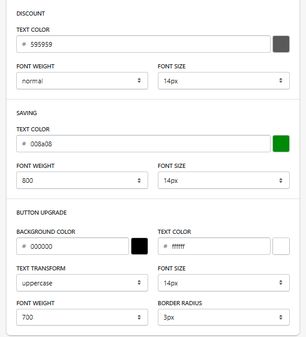
Discount
Text Color
Defines discount label color.
Font Weight / Size
Controls appearance.
Saving
Text Color
Defines savings highlight color.
- Example: #008a08 (green)
Font Weight / Size
Controls emphasis.
Button Upgrade (Upsell CTA inside product)
Background Color
Defines button background.
Text Color
Defines button text color.
Text Transform
Controls formatting.
Font Size
Defines size.
Font Weight
Defines thickness.
Border Radius
Controls button shape.
How It Works
This section controls:
- Product card appearance
- Pricing hierarchy
- Discount visibility
- CTA styling
All changes directly impact how products are perceived in the cart.
Summary
The Body & Product Styles section allows you to:
- Fully customize product appearance in the cart
- Control pricing and discount visibility
- Style remove buttons and quantity controls
- Optimize UI for conversions
It is one of the most important sections for visual clarity and conversion optimization.
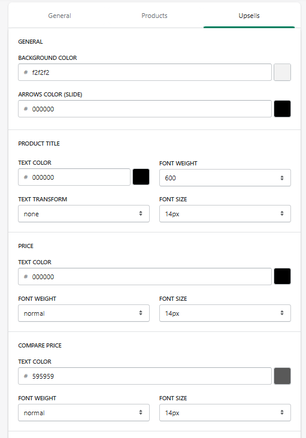
Upsell Styles
The Upsells tab allows you to customize the visual appearance of upsell product blocks displayed inside the slide cart.
This includes styling for:
- Background
- Product titles
- Prices
- Buttons
General Settings
Background Color
Defines the background color of the upsell section.
- Example: #f2f2f2
Arrows Color (Slide Mode)
Defines the color of navigation arrows when upsells are displayed as a slider.
- Example: #000000
Product Title
Text Color
Defines the color of the product title.
Font Weight
Defines text thickness.
- Example: 600
Text Transform
Controls formatting.
- Example: none
Font Size
Defines text size.
- Example: 14px
Price
Text Color
Defines the main price color.
Font Weight
Defines thickness.
Font Size
Defines size.
Compare Price
Text Color
Defines the original (compare-at) price color.
- Example: #595959
Font Weight / Size
Controls appearance.
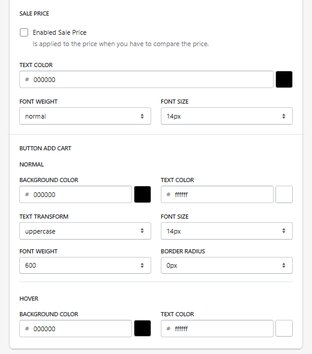
Sale Price
Enable Sale Price
Activates sale price display when applicable.
Text Styling
- Color
- Font weight
- Font size
Add to Cart Button
This controls the CTA button inside upsell items.
Normal State
Background Color
Defines button background.
Text Color
Defines button text color.
Text Transform
Controls formatting.
- Example: uppercase
Font Size
Defines size.
Font Weight
Defines thickness.
Border Radius
Controls button shape.
Hover State
Background Color
Defines hover background.
Text Color
Defines hover text color.
How It Works
This section controls how upsell products are visually presented:
- Impacts product visibility
- Affects CTA clarity
- Influences user interaction
Well-designed upsells can significantly increase conversion rates.
Summary
The Upsell Styles section allows you to:
- Fully customize upsell product appearance
- Control pricing and typography
- Design high-converting CTA buttons
- Align upsell design with your store branding
It is a critical section for maximizing upsell performance and revenue.


