Quick Buy (One-Click Purchase Button)
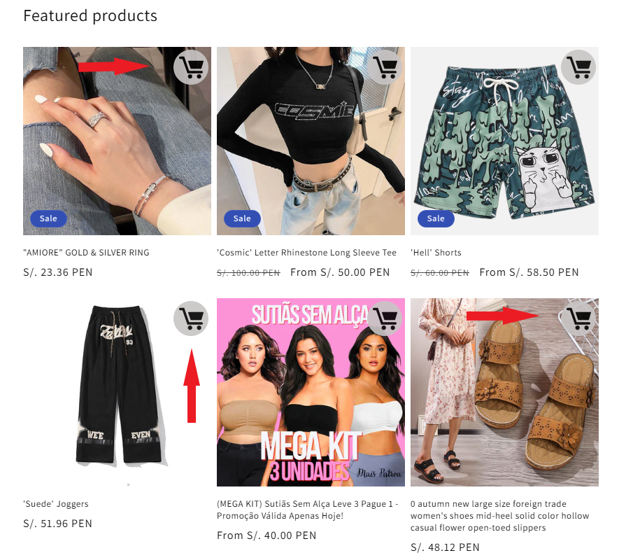
The Quick Buy feature adds a fast purchase button to product listings, allowing customers to add products to the cart with a single click.
It is designed to reduce friction and speed up the buying process.
Activation
At the top:
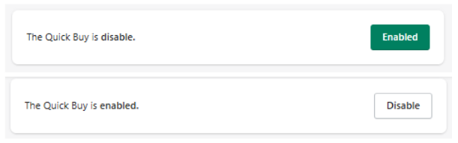
- Disabled → Quick Buy is not visible
- Enabled → Quick Buy is active
Hide Quick Buy (Product-Level Control)
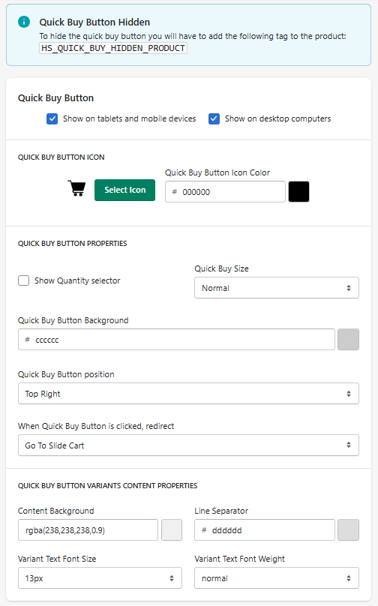
To hide the Quick Buy button for specific products, add the following tag:
HS_QUICK_BUY_HIDDEN_PRODUCT
Products with this tag will not display the Quick Buy button.
Device Visibility
Show on Tablets and Mobile Devices
Show on Desktop Computers
You can control where the Quick Buy button appears.
Quick Buy Button Icon
Select Icon
Choose the icon displayed on the button.
Icon Color
Defines the icon color.
- Example: #000000
Button Properties
Quantity Selector
Show Quantity Selector
Allows users to select quantity before adding to cart.
Button Size
Quick Buy Size
Defines button size.
- Example: Normal
Background Color
Quick Buy Button Background
Defines button background color.
- Example: #cccccc
Position
Quick Buy Button Position
Defines where the button appears on the product card.
- Example: Top Right
Click Behavior
Redirect After Click
Defines what happens when the button is clicked:
- Go To Slide Cart → opens cart
- (Other behaviors may depend on configuration)
Variant Content (Modal / Dropdown)
If the product has variants, Quick Buy may display a selection UI.
Content Background
Defines background of variant selector.
- Example: rgba(238,238,238,0.9)
ine Separator
Defines divider color.
- Example: #dddddd
Variant Text
Font Size
Defines text size.
Font Weight
Defines thickness.
How It Works
- Appears on product cards or listings
- Allows adding to cart instantly
- If variants exist → opens selection
- Reduces steps in purchase flow
Use Cases
- Product grids (collections)
- Featured products
- Mobile-first shopping
- Fast checkout experience
Best Practices
- Keep button visible but not intrusive
- Use clear icon and contrast
- Enable quantity selector when needed
- Ensure variant selection UX is smooth
Summary
The Quick Buy feature allows you to:
- Add a one-click purchase button
- Reduce friction in buying process
- Improve conversion rates
- Customize behavior and design


