Cart Bar (Sticky Add to Cart)
The Cart Bar (also known as Sticky Add to Cart Bar) allows you to display a persistent add-to-cart section on the screen, improving product visibility and conversion.

Activation
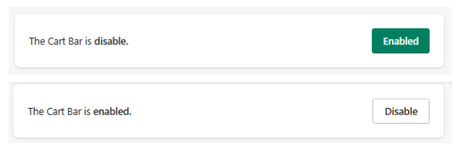
At the top:
- Disabled → Cart Bar is not active
- Enabled → Cart Bar is active
Hide Cart Bar (Product-Level Control)
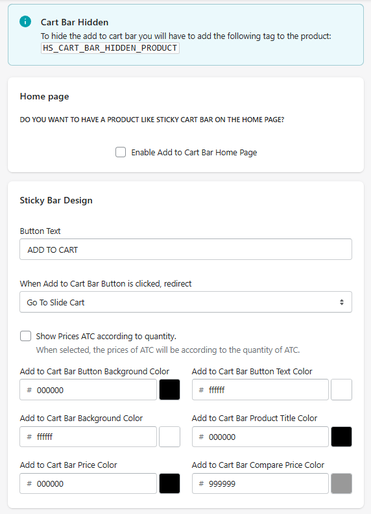
HS_CART_BAR_HIDDEN_PRODUCT
Products with this tag will not display the sticky bar.
Home Page Option
Enable Add to Cart Bar on Home Page
Allows showing a product with a sticky cart bar directly on the homepage.
Sticky Bar Design
Button Text
Defines the CTA text.
- Example: ADD TO CART
Button Action
Redirect Behavior
Defines what happens after clicking:
- Go To Slide Cart → opens the cart
- (Other behaviors may be available depending on setup)
Price Behavior
Show Prices According to Quantity
If enabled, price updates dynamically based on selected quantity.
Colors
Button Background Color
Defines CTA background.
Button Text Color
Defines CTA text color.
Bar Background Color
Defines the full bar background.
Product Title Color
Defines product name color.
Price Color
Defines main price.
Compare Price Color
Defines original price.
Sticky Bar Settings
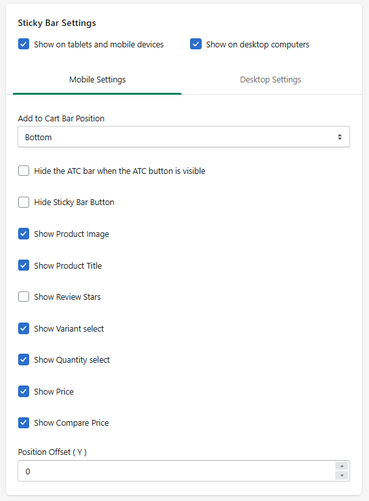
Device Visibility
- Show on mobile & tablet
- Show on desktop
Position
Add to Cart Bar Position
Defines where the bar appears.
- Example: Bottom
Visibility Rules
Hide ATC Bar When Default ATC is Visible
Avoids duplicate buttons.
Hide Sticky Bar Button
Hides only the button but keeps other info.
Elements Visibility
You can toggle visibility for:
- Product image
- Product title
- Review stars
- Variant selector
- Quantity selector
- Price
- Compare price
Offset
Position Offset (Y)
Adjusts vertical position of the bar.
How It Works
The Sticky Cart Bar:
- Stays visible while the user scrolls
- Keeps the Add to Cart action always accessible
- Reduces friction in the buying process
Use Cases
- Product pages with long content
- Mobile optimization
- Increasing add-to-cart rate
- Highlighting key products
Best Practices
- Keep CTA highly visible
- Avoid duplicating too many elements
- Use strong contrast for button
- Optimize for mobile first
Summary
The Cart Bar allows you to:
- Add a persistent Add to Cart experience
- Improve conversion and usability
- Customize layout, content, and behavior
- Control visibility per product and device


