Synonyms Configuration
The Synonyms section allows you to define alternative terms that the search engine should treat as related or equivalent.
This feature improves search accuracy by matching customer terminology with your product catalog terminology.
Customers may use different words than those used in your product titles, tags, or descriptions. Synonyms help bridge that gap.
Purpose of Synonyms
Synonyms ensure that:
Searches return relevant results even if different wording is used.
Customers find products despite variations in terminology.
Search intent is better interpreted.
Zero-result searches are reduced.
Synonym Types
Filtor Search supports two types of synonym relationships:
1. Equivalence Synonyms
Equivalence means that all terms in the group are treated as equal and interchangeable.
Example:
If you define: bikini ↔ swimsuits ↔ beachwear.
Then:
Searching for “bikini” will also return products related to “swimsuits” and “beachwear”.
Searching for “swimsuits” will also return results for “bikini”.
The relationship works both ways.
Best Use Case:
Similar product names.
Regional wording differences.
Singular/plural variations.
Common alternative naming.
2. Inferred Synonyms
Inferred synonyms create a one-directional relationship.
Example:
If you define: tablet → iPad Pro, Samsung Galaxy Tab, Microsoft Surface Pro
Then:
Searching for “tablet” will show those specific products.
-
However, searching for “Samsung Galaxy Tab” will NOT return results for “iPad Pro”. This creates a parent-to-specific relationship.
Best Use Case:
Category-to-product mapping.
General search terms pointing to specific SKUs.
Brand grouping under a broader concept.
Adding a Synonym Group
Click Add synonym.
-
Define the synonym type (Equivalence or Inferred).
-
Enter the related terms.
-
Save the configuration.
You can create multiple synonym groups to support different search scenarios.
Best Practice Recommendations
Add synonyms for commonly misspelled words.
Include plural and singular variations.
Add regional language differences.
Map general category terms to specific products.
Review Analytics → Zero-Result Searches to identify missing synonym opportunities.

Add Synonym
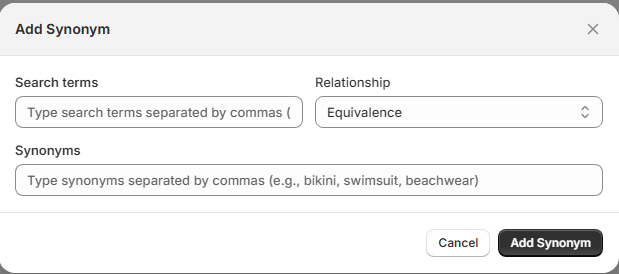
The Add Synonym modal allows you to create a new synonym group to improve search relevance and result accuracy.
Synonyms help the search engine recognize related terms and return more accurate results when customers use different
Fields Overview
When creating a synonym, you must configure the following fields:
1. Search Terms
This field defines the primary term or terms that will trigger the synonym behavior.
Enter one or multiple terms.
Separate multiple terms using commas.
Example: tablet or shirt, tshirt
These terms act as the base search queries.
2. Relationship
Defines how the sy
Available option shown:
Equivalence
Other possible relationship types (if available in the system):
Inferred (one-directional)
Equivalence Relationship
When selected:
All terms are treated as equal.
The relationship is bidirectional.
Any term in the group will trigger results for the others.
Example:
Search term: bikini
Synonyms: swimsuit, beachwear
Searching for:bikini → returns swimsuit and beachwear products
swimsuit → returns bikini products
3. Synonyms
This field defines the alternative terms related to the main search term.
-
Enter synonyms separated by commas.
-
Example: bikini, swimsuit, beachwear
These terms will be associated according to the selected relationship type.
Best Practices
Include plural and singular variations.
Add common misspellings.
Add regional language differences.
Use Analytics (Zero-Result Searches) to identify missing terms.
Keep synonym groups logically related.
Business Impact
Reduces zero-result searches.
Improves search intelligence.
Increases product visibility.
Enhances customer satisfaction.
Supports higher conversion rates.