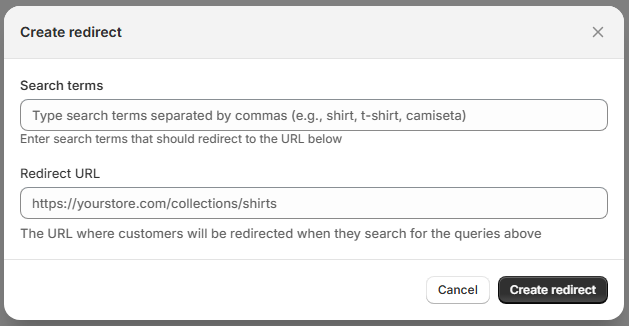
The Search Redirects feature allows you to automatically redirect customers to a specific URL when they search for defined terms.
This is useful for guiding users directly to curated collections, landing pages, campaigns, or specific content instead of showing standard search results.
Create Redirect
When creating a new redirect, a modal window titled Create redirect will appear.
You must configure the following fields:
1. Search Terms
This field defines which search queries will trigger the redirect.
Enter one or more search terms.
Separate multiple terms using commas.
Example: shirt, t-shirt, camiseta
When a customer searches for any of these terms, they will be redirected automatically.2. Redirect URL
This field defines the destination URL where customers will be sent.
Example: https://yourstore.com/collections/shirts
This can be:
A collection page
-
A product page
-
A landing page
-
A promotional campaign page
-
Any valid URL within your store
Action Buttons
-
Cancel – Closes the modal without saving.
-
Create redirect – Saves the rule and activates the redirect.
How Search Redirects Work
When a customer searches for a configured term:
-
The system checks for a matching redirect rule.
-
If a match exists, the customer is redirected to the specified URL.
-
Standard search results are bypassed.
Example Use Cases
Campaign Landing Pages
Search term: black friday
Redirect to: /collections/black-friday-deals
Brand-Specific Pages
Search term: nike
Redirect to: /collections/nike
Informational Content
Search term: size guide
Redirect to: /pages/size-guide
Best Practices
-
Use redirects for high-intent keywords.
-
Avoid creating overlapping redirect rules.
-
Redirect only when you want to fully override search results.
-
Review Analytics to identify strong search terms suitable for redirecting.
-
Use redirects for seasonal campaigns and promotions.